Losing access to your Electrum wallet can be costly, but in many cases it's fixable. This guide walks through every recovery method step by step: seed phrase, BIP39 and SLIP39 seeds, custom word extension, 2FA wallets, private keys, hardware wallets and the wallet file itself, plus what to do with very old Legacy Electrum wallets and how to troubleshoot the most common errors.
How to Recover an Electrum Wallet
How you restore an Electrum wallet depends on what information you still have. The seed phrase is the easiest route, but it isn't the only one. Here's a quick overview:
| Information Available | Your Route to Regain Access: |
|---|---|
| Private Key | Import the private key directly |
| Electrum Seed Phrase | Import the seed phrase |
| BIP39/SLIP39 Seed Phrase | Import the BIP39/SLIP39 seed and check BIP39/SLIP39 in the option setting |
| Electrum Seed Phrase and Custom Word Extension | Import the seed phrase, check "Extend this seed" in the options menu and import your custom word extension |
| Electrum 2FA Seed Phrase | Import the 2FA seed via the 2FA option and keep or disable TrustedCoin |
| Electrum Wallet File and Password | Import the wallet file and enter the password |
| Wallet file available, password forgotten | Restore via seed phrase if possible; otherwise assess password recovery options |
| Only Address or Public Key | No real access, but watch-only import is possible |
| Hardware Wallet | Connect the device via "Use a hardware device" |
| No usable recovery material | Consulting with a wallet recovery service |
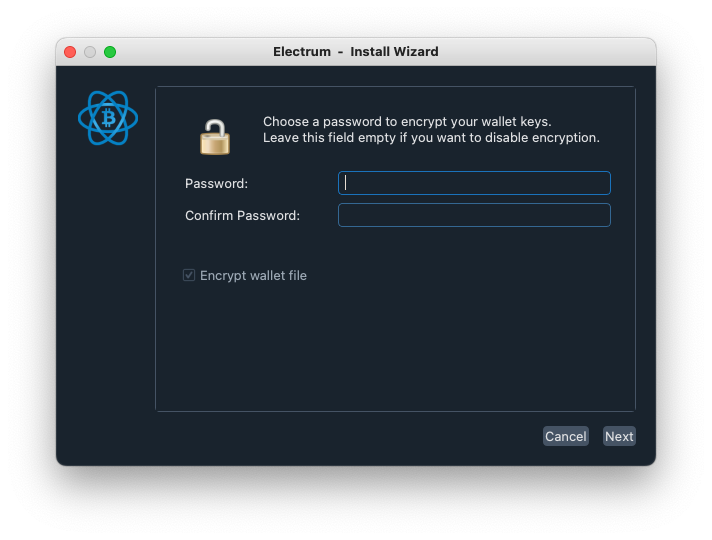
Whichever method you use, every restore ends by setting a password for the new wallet file. This password only encrypts the file on your computer. It is not a custom word extension and it is not part of your seed.
Due to Electrum's popularity, it has inspired malicious actors to create copycat websites and lure in Bitcoin users. For instance, hackers have used false domain names like "Electrum.com" to prey on Bitcoin holders. If you download "Electrum" from one of these fake sites, you could lose all your BTC and expose your private keys. The authentic Electrum wallet is only available via electrum.org. If in doubt, check Electrum's GPG signature before entering any sensitive data.
Restore Your Electrum Wallet via Private Key Import
If you have your compressed or uncompressed WIF private key or your master private key, you can restore your Electrum wallet by following these steps.
Restoring WIF private keys starting with "K", "L" or "5"
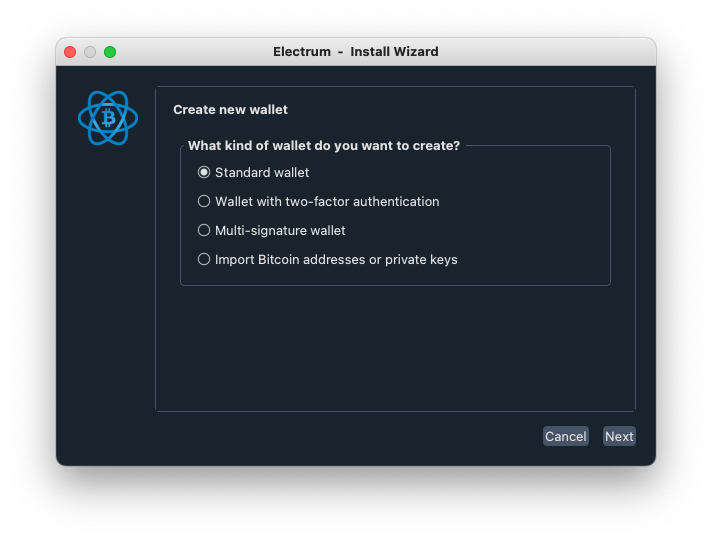
- Open Electrum and select "File" then "New/Restore" or click "Next", when already in the "Create/Restore" window.
- Choose "Import Bitcoin address or private keys".
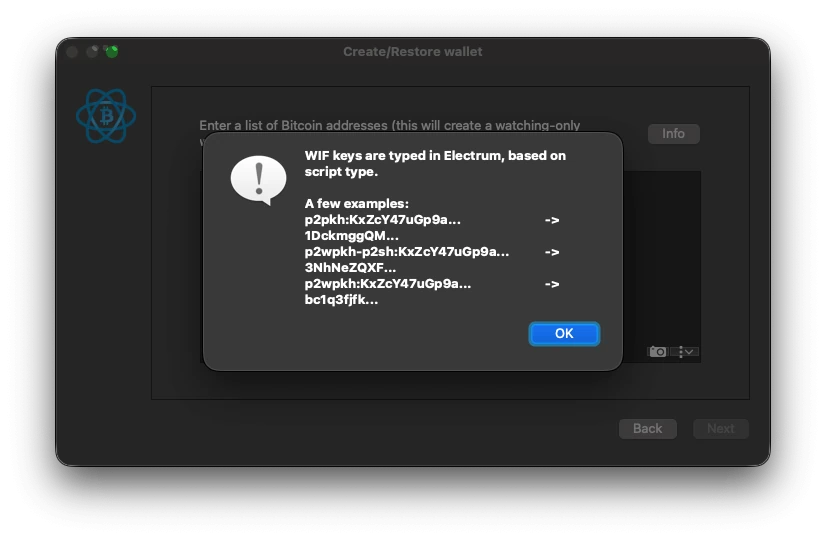
- Enter your private keys with the script type in front (p2pkh, p2wpkh-p2sh, p2wpkh-p2sh) and click "Next".
If you do not know which script type to choose, Electrum will display a help menu via the "Info" button.
Restoring Master Private Key starting with "xprv", "yprv" or "zprv"
- Open Electrum and select "File" then "New/Restore" or click "Next", when already in the "Create/Restore" window.
- Select "Standard Wallet".
- Choose "Use a master key".
- Enter your master private key and click next.
With a master private key, you will not have to enter the script type or derivation path.
Restore Your Electrum Wallet via Seed Phrase
If you have your Electrum seed phrase, you can restore your account by following these steps:
- Open Electrum and select "File" then "New/Restore" or click "Next", when already in the "Create/Restore" window.
- Choose "Standard Wallet" and click next.
- The following window will be the "Keystore" window. Select "I already have a seed".
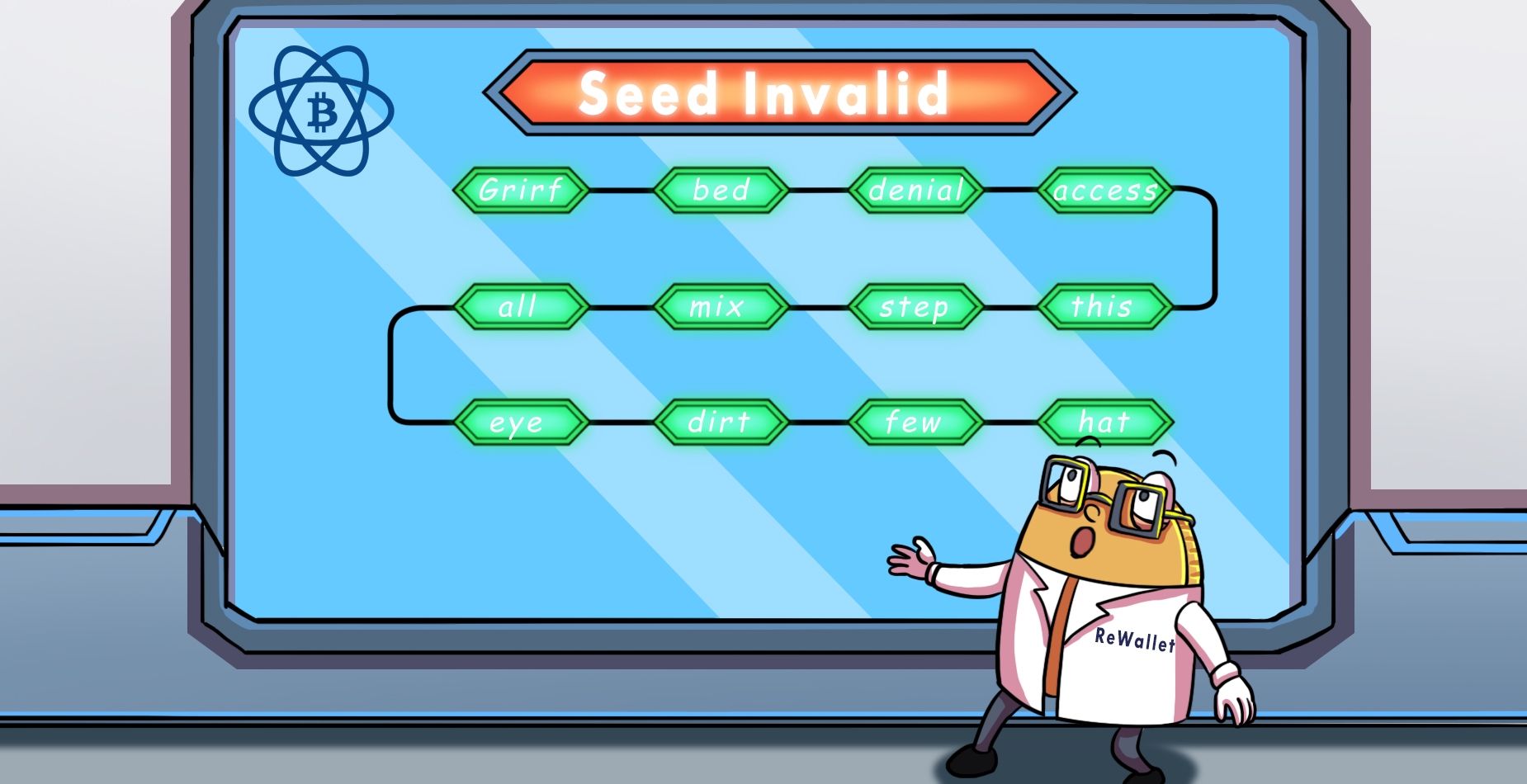
- Enter your Electrum seed phrase (usually 12 words; seeds created with Electrum 2.0–2.6 have 13). If Electrum recognizes your seed, it shows its seed type, e.g. "standard", "segwit" or "old". If your seed is invalid, Electrum shows no error message. The "Next" button simply stays grey. Note that old pre-2.0 seeds are accepted even with wrong words or in the wrong order, so for these, only your restored addresses confirm the seed is correct.
- After successfully importing your seed phrase, you should be able to see your restored Electrum wallet balance.
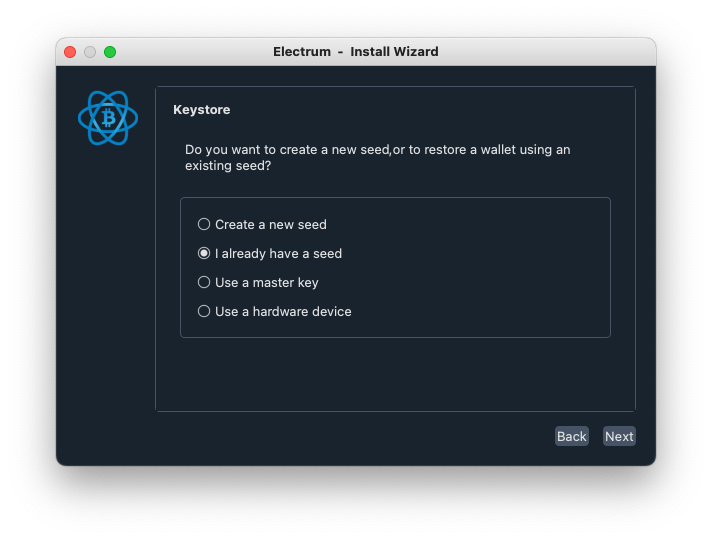
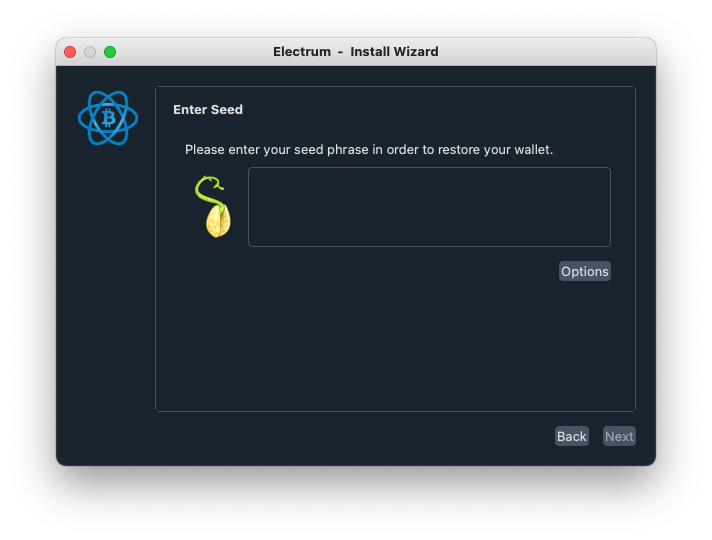
With an Electrum seed phrase you will not be asked for the derivation path or script type. Electrum should display the addresses containing your balance automatically after a successful restore.
If Electrum doesn't accept your seed, the cause is usually a typo, a wrong word order, a seed from a different wallet or the wrong wallet type. Our guide "Invalid Electrum Seed? How It Works and How to Fix It" covers every cause and fix, or you can use our Electrum wallet recovery service for professional assistance.
Importing BIP39 or SLIP39 Seed Phrases into Electrum
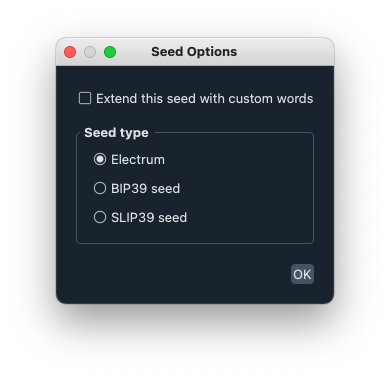
If you have a BIP39 or SLIP39 seed phrase, which is not native to Electrum, you can still follow the above steps. However, when arriving at Step 4 in the Keystore window, click "Options" and check "BIP39" or "SLIP39". Otherwise the "Next" button will remain grey. One way of telling you've selected the right seed option is the warning Electrum displays below the seed entry box when importing a BIP39 or SLIP39 seed phrase: "BIP39/SLIP39 seeds can be imported in Electrum, so that users can access funds locked in other wallets.[…]". If your BIP39 seed phrase is invalid, Electrum displays "BIP39 (checksum: failed)" below the seed entry box.
SLIP39 backups come in two forms. With a single-share backup, you enter its complete word list (20 or 33 words) and continue as usual. With a multi-share backup, one share isn't enough: you need to enter enough shares from the same backup to reach the threshold you set when you created it, for example 2 of 3 or 3 of 5. Enter the first share, click "Next share" and repeat until Electrum shows that the threshold is reached. Shares that belong to the same backup start with the same two words, which helps you sort them if you have several sets.
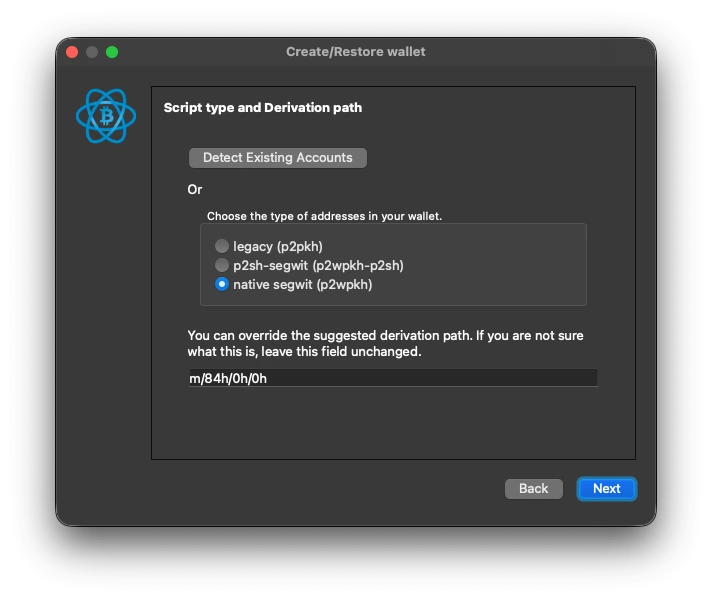
When importing BIP39 and SLIP39 seed phrases, Electrum asks for the script type and derivation path. We suggest using Electrum's "Detect existing accounts" function or entering the derivation path of your previous wallet manually. If your original wallet used a passphrase, also select "Extend this seed with custom words" under Options and enter it exactly as written. Unlike Electrum's own custom words, BIP39 and SLIP39 passphrases are case-sensitive.
Restore Your Electrum Wallet with a Seed Phrase and Custom Word Extension
If Electrum accepted your seed and showed a seed type, but the restored wallet turns out to be empty, you may have used a custom word extension and need to restore it alongside the seed phrase. Please note: This custom word is separate from the Electrum wallet password you set to encrypt the wallet file.
In order to restore your Electrum wallet with its custom word extension, the process closely mirrors the above with just one extra step:
- Open Electrum and select "File" then "New/Restore" or click "Next", when already in the "Create/Restore" window.
- Choose "Standard wallet" and then "I already have a seed".
- Before typing your seed, click the "Options" button.
- Check the box "Extend this seed with custom words" and confirm.
- Enter your Electrum seed phrase.
- On the next screen, Electrum will ask for your custom word. Enter it exactly as you documented it.
- Complete the remaining setup steps. Your wallet and its funds should now be accessible.
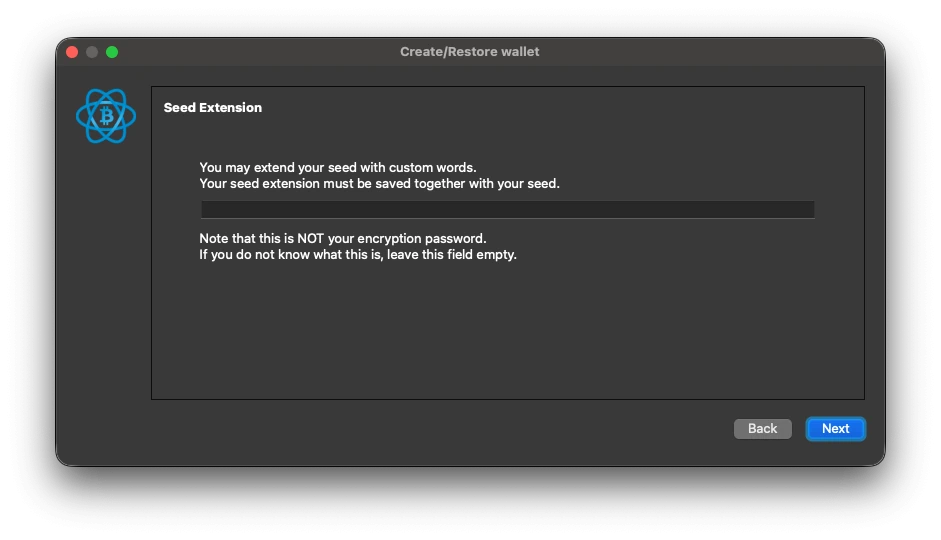
If you want to learn more about the Electrum custom word extension, you can find additional information in our dedicated guide - "Electrum Custom Word Extension: How to Recover It"
Please note: If Electrum labels your seed "old", an extension isn't possible, because custom words were only introduced in Electrum 2.7.
Restore Your Electrum Wallet via 2FA Seed
Electrum supports two-factor (2FA) wallets through the TrustedCoin service. During setup, you scanned a QR code into an authenticator app, which then generated the codes needed to sign transactions. To recover your 2FA wallet, follow these steps:
- Open Electrum and select "File" then "New/Restore".
- Choose "Wallet with two-factor authentication".
- Choose "I already have a seed" and enter your 2FA seed phrase.
- When your seed is entered correctly, Electrum shows "Seed Type: 2fa_segwit" (or "2fa" for older wallets). Note that 2FA seeds created before Electrum 2.7 are usually 24 or 25 words long. Then click "Next", or "Options" → "Extend this seed with custom words" if you used a custom word extension with your 2FA setup.
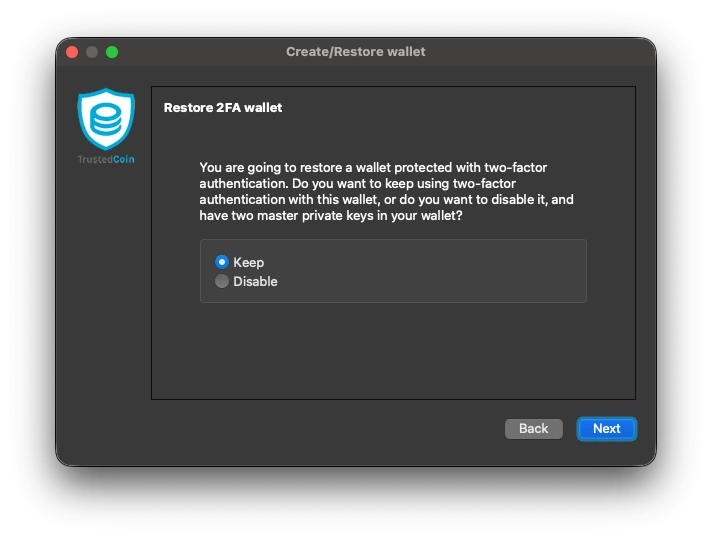
You will then be asked if you want to keep 2FA enabled for this wallet. If you do, you will need to provide the "Authenticator code" to finish your setup. If you no longer have your authenticator app, Electrum lets you reconfigure it at this step.
If you choose to disable 2FA, your second master key will be added to your wallet file and the wallet can be used without TrustedCoin’s 2FA service.
Can You Recover an Electrum Wallet Without the Seed?
Yes! Losing the seed phrase does not automatically mean your Bitcoin are gone. If the wallet file still exists (or the device it is stored on does), the wallet can often be recovered without any seed. What matters more is what you still have: a wallet file plus password memories is a workable starting point; partial seed information helps; a completely lost seed with no wallet file and no device is usually the end of the road. If you find yourself locked out of your Electrum wallet, ReWallet's Electrum recovery service evaluates your case for free.
Restore Your Electrum Wallet via Wallet File and Password
Locating Your Electrum Wallet File
Your Electrum wallet file (commonly named default_wallet or a custom name you chose when creating the wallet) contains your (encrypted) private keys and is all Electrum needs to recover your wallet.
Where Electrum stores wallet files:
- Windows: C:\Users\YourUsername\AppData\Roaming\Electrum\wallets
- macOS: /Users/YourUsername/.electrum/wallets (hidden folder; press Cmd + Shift + . in Finder to show it)
- Linux: /home/YourUsername/.electrum/wallets
If you used the portable Windows version, the wallets are in the "electrum_data" folder next to the .exe file.
Don't see it there? Check the places you may have backed it up years ago: external drives, USB sticks, old laptops, cloud storage or email attachments you sent yourself. Any copy of the file works. It doesn't have to be the original file.
Using the Electrum Wallet File
Once you’ve located your file: make a copy of it and work only with the copy. If anything goes wrong during your restore attempt, the original file stays intact. Then follow these steps:
- Install the latest version of Electrum from Electrum.org. On startup, Electrum automatically tries to open the most recently used wallet — if that's not the one you need, continue with step 2.
- Click File → Open and navigate to the wallets folder (paths above) or to wherever your backup copy is stored.
- Select the wallet file. If the file was created with a very old Electrum version, the client may ask to convert it — this is another reason to work on a copy, since conversion changes the file.
- If the wallet is encrypted, Electrum asks for your password. Enter it exactly as you set it. Passwords are case-sensitive and Electrum won't tell you what's wrong, only that decryption failed. If you're trying several candidates, keep a written log of every attempt so you don't repeat yourself.
- Once the file decrypts, your addresses appear immediately; the balance shows after Electrum syncs with the network. You see the syncing progress on the lower-left of your screen.
Forgotten Password or Corrupted Wallet File? When the File Method Fails
Two problems stop most people here. The first is the forgotten password: Electrum's encryption has no backdoor and no reset. Without the password, the file won't decrypt no matter how many times you try. The second is a damaged or deleted wallet file: data corruption or a file deleted years ago can all leave you with a file Electrum refuses to open or no file at all.
Neither means your Bitcoin is lost. Both are core cases for ReWallet's Electrum wallet recovery service: we recover forgotten passwords from whatever fragments you remember, repair corrupted wallet files and can often restore deleted files from the original storage medium. The evaluation of your case is free, and payment is success-based — no recovery, no cost.
Recovering an Old Electrum Wallet (Legacy Versions)
Many recovery cases involve wallets created a decade or more ago, and old Electrum wallets have quirks.
Seeds from before Electrum 2.0 (2015) use a different list of 1,626 words and are 12 or 24 words long. They can still be restored with the normal seed workflow and Electrum labels them "Seed type: old". Be aware that these seeds have no checksum: Electrum accepts them in any word order and a wrong order simply opens a different, empty wallet.
Seeds from Electrum 2.0–2.6 are 13 words long and 2FA seeds created before version 2.7 are usually 24 or 25 words.
Old wallet files can also use outdated formats that a current Electrum version may not open directly. If you're not sure which era your seed comes from, our invalid Electrum seed guide shows how to check.
Two rules for legacy recoveries: first, never overwrite or 'repair' the original wallet file — always work on a copy. Second, note everything you know about when the wallet was created; the version era determines the right recovery path. If your wallet dates back to Electrum's early years and standard restores fail, this is a case where professional tooling can make a difference.

Struggling with Electrum Wallet Recovery?
ReWallet can help you recover your Electrum wallet in case of lost passwords, invalid seeds or lost/inaccessible backups. The Best: ReWallet works solely on a success-based fee for you. No recovery, no pay!
Recover your Electrum WalletRestoring an Electrum Wallet That Used a Hardware Wallet (Ledger, Trezor)
Electrum supports hardware wallets such as Trezor and Ledger. When you restore your Electrum wallet, you’ll see an option to "Use a Hardware Device". If you used a hardware wallet with your original Electrum wallet, you can restore it by connecting the device you initially used during the set-up process.
Please note however, that when restoring or pairing your hardware wallet with Electrum, your private keys will only remain on the hardware device, as intended. This means that the wallet file Electrum creates for you will only contain your hardware wallet’s public keys. If you lose the hardware wallet or its seed phrase, this wallet file will not be able to restore access to your funds. In short: When using a hardware wallet, the Electrum wallet file does not serve as an additional sufficient backup.
There’s also a way to directly import your seed phrase from a hardware wallet into Electrum, but it’s not a good idea from a security perspective. Hardware wallets keep your private keys offline, which makes them less prone to malware. If you want to import your seed phrase anyway, follow the steps above for importing a BIP39 seed phrase. You’ll also need to select "Extend This Seed with Custom Words" if you use an optional passphrase with your hardware wallet. Just remember that Electrum wallets only handle BTC, so you can’t import non-Bitcoin assets into Electrum.
Restore Your Electrum Wallet via Address or Master Public Key (Watch-Only)
You can also import an address or public key into Electrum.
When using a single or multiple BTC addresses: File, New/Restore and "Import Bitcoin address or private keys".
When using a master public key (xpub, zpub or ypub) you need to follow these steps instead:
- Open Electrum and create a new wallet.
- Select "Standard Wallet".
- Choose "Use a master key".
- Enter your master public key and click next.
Both of these methods will produce a watch-only wallet, meaning you can see the funds but you will not be able to sign any transaction e.g. spend from it. A "watch-only" wallet is not a sufficient backup as it does not include any private keys nor is it a proof of ownership of the funds displayed.
Troubleshooting Electrum Wallet Recovery: Common Electrum Errors and Fixes
While it's easy to understand the general framework for restoring an Electrum wallet, there are more nuanced issues that could arise, especially if people used some of Electrum's add-on security features. Below are the four situations that stop most Electrum recoveries and what to do in each.
Your Electrum Seed Phrase is Invalid
If the Electrum seed phrase you enter is invalid, Electrum will NOT display any warning or error message. The only sign that the seed contains an error is that the "Next" button stays grey. Review each word carefully and use the word suggestions Electrum provides to rule out typos. If the button still doesn't become clickable, the cause can range from easily solvable to requiring professional tooling.
Old pre-2.0 seeds, which Electrum labels "old", are trickier: Electrum doesn't detect errors in them at all. As long as all 12 or 24 words are on the old Electrum wordlist, the seed is accepted, even in the wrong order or with a wrong word from the list. The only sign is an empty wallet after the restore.
We've covered every cause and fix in our dedicated guide: "Invalid Electrum Seed? How It Works and How to Fix It".
Electrum Can't Find Your Wallet File
If you're trying to restore your Electrum wallet using a file, Electrum may show "Wallet file not found". Usually you're in the wrong directory for your operating system (paths above). In rare cases Electrum shows this message when the file itself is damaged and unreadable.
If you can't find your wallet file, you may have deleted it in the past. In that case, first stop using the device: every new file written to the drive can overwrite the data you're trying to recover. You can attempt a file recovery on your own with tools like Recuva (Windows) or PhotoRec (Mac/Linux), but every recovery attempt carries a risk of irreversible data loss. Never install or run the recovery software from the drive you're trying to recover from. On modern SSDs, deleted files are often wiped quickly, so the chances drop over time.
If the above fails, you may need to contact ReWallet to help locate your file and get back into your Electrum wallet.
Your Electrum Multisig Wallet Won't Restore
Multisig wallets need several keys to spend funds, which makes recovery more complex. What you need depends on the setup: in a 2-of-3 wallet, for example, you need any two of the three seeds or private keys, plus the public keys (xpubs) of all three cosigners to rebuild the wallet. Losing one key in a 2-of-3 setup is therefore not a problem; losing two is.
When restoring, select "Multi-signature wallet" instead of "Standard wallet" and enter the same number of cosigners and required signatures as in the original setup. If a seed or xpub is missing, check old backups, older wallet files and any separately stored configuration files. Note that a cosigner may also have been a hardware wallet.
Correct Seed, but Your Electrum Wallet Is Empty
If Electrum accepts your seed but the restored wallet shows an empty balance and unfamiliar addresses, you most likely set up a custom word extension (sometimes called the "13th word") when creating the wallet. If you've lost or can't remember the extension, see our dedicated guide: Electrum Custom Word Extension: How to Recover It.
Other causes are restoring under the wrong wallet type (standard vs. 2FA vs. multisig), an incomplete network sync, or, rarely, a typo that happened to pass Electrum's check. You can usually spot the typo case when the seed type doesn't match your old addresses, for example "standard" when your addresses started with bc1.
With old pre-2.0 seeds, a wrong word order or a wrong word from the old wordlist also leads to an empty wallet, since Electrum can't detect these errors.
Electrum Wallet Recovery FAQs
- **Windows:** C:\Users\YourUsername\AppData\Roaming\Electrum\wallets
- **macOS:** /Users/YourUsername/.electrum/wallets (hidden folder)
- **Linux:** /home/YourUsername/.electrum/wallets