Strongcoin isn’t as strong as it used to be. A few years after this popular web-based wallet appeared in the crypto ecosystem, it steadily eroded to become a defunct Bitcoin storage solution. Nowadays, whenever someone online talks about Strongcoin, it’s most likely you’ll hear about some issue or complaint related to restoring an old account. Some user report hacked/stolen Strongcoin accounts or missing Strongcoin private keys while others report the Strongcoin website and 2FA-function as completely defunct.
However, just because there’s no active maintenance on Strongcoin’s system and many users are complaining, it doesn’t mean the BTC in these wallets is irrecoverable. Provided you have the Strongcoin paper backup and your password (or some idea of it) it’s still possible to recover your Strongcoin wallet.
Over the years, ReWallet has helped many clients with Strongcoin wallet recovery issues, such as forgotten passwords and issues with decrypting their backups. Let’s walk through how Strongcoin wallets work, how their paper backups can be decrypted, and what to do if you forgot your Strongcoin wallet password.

Need Help Recovering your Strongcoin Wallet?
Find yourself locked out of your Strongcoin wallet funds? We at ReWallet offer specialized Strongcoin wallet recovery service to recover your funds for you. Reach out today for a free evaluation!
Recover your Strongcoin WalletWhat is the Strongcoin Bitcoin Wallet?
Strongcoin was a Bitcoin web wallet that played a big role in the early development of self-custodial wallet security. Founded in 2011 by the UK-based developer Ian Purton, Strongcoin’s defining feature was its client-side encryption, which meant users’ private keys were generated and encrypted in the browser using their password before being stored online. So, Strongcoin itself never had access to unencrypted keys, which gave early Bitcoin adopters intermediary-free custody.
Although Strongcoin gained a following early on, it couldn’t remain competitive against the growing number of newer and more user-friendly desktop, mobile, and hardware wallets. Over time, maintenance on Strongcoin slowed to the point that it became a defunct wallet. Currently, Bitcoin recovery from this wallet is only possible with user-held backups.
How the Strongcoin Paper Backup Works
Strongcoin provided users with a paper/PDF backup of their wallet that served as a safeguard against account loss or service unavailability. This backup contains the wallet’s private keys in encrypted form. So, Strongcoin users could still recover their funds independently with this data.
Even though Strongcoin’s team doesn’t actively manage this wallet, you can see what the paper backup looks like on the official Strongcoin website:
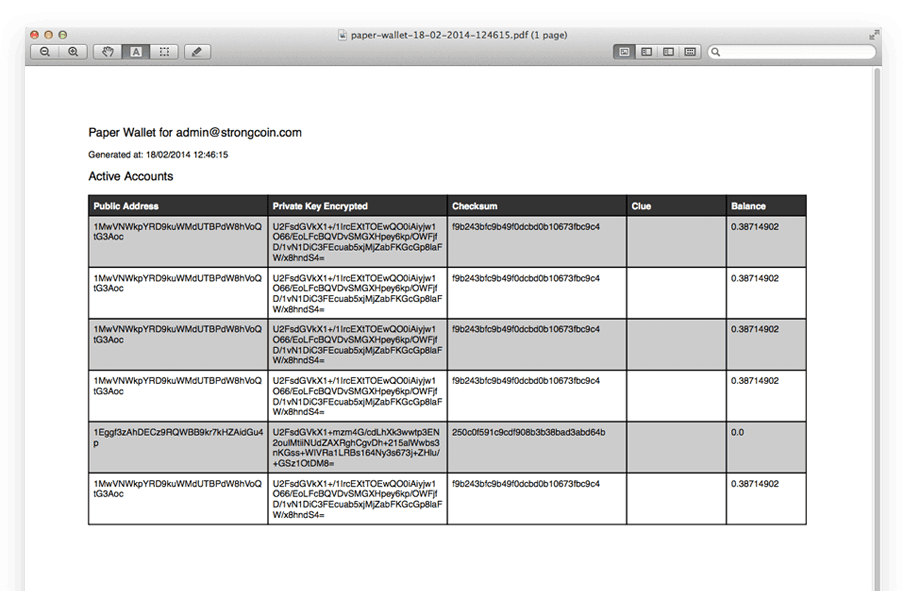
The private keys included in the paper backup are encrypted using the user’s wallet password at the time of creation. Remember that Strongcoin used client-side encryption, so the encryption process occurred in the user’s browser before any data was stored or exported. As a result, only someone with the correct password can decrypt the backup into usable Bitcoin keys.
To help users remember their password in the future, Strongcoin allowed them to manually add a hint. This clue isn’t essential to the decryption process; it’s just a helpful reminder for the user.
Ultimately, Strongcoin recovery success depends entirely on the accuracy of the remembered password and the usefulness of this hint.
How to Decrypt Your Strongcoin Paper Wallet Backup
If you still have the correct password for your Strongcoin paper backup, it’s possible to manually decrypt the encrypted private key stored within it. Strongcoin uses client-side AES-256 encryption, so the private key on your backup is fully usable once decrypted. Just remember that password accuracy is essential for a successful Strongcoin recovery process.
But that doesn’t mean you can’t recover a Strongcoin wallet if you forgot your password. In these more complex cases, however, you should consult the wallet recovery experts at ReWallet who have years of experience helping clients with problems retrieving BTC from wallets like Strongcoin. Our team will look into the specifics of your situation to determine if and how to regain access to your Strongcoin wallet.
For those who have the required information and feel confident attempting a manual recovery, make sure you’re working in a secure and trusted environment. Ideally, use a clean computer and, if possible, temporarily disconnect from the Internet. Also, ensure you have multiple backups of your paper or PDF.
Note that exposing private keys on an untrusted or compromised machine can result in immediate, irreversible loss of funds.
Step-by-Step: Decrypting a Strongcoin Paper Backup
1. Locate Your Paper or PDF Backup and Password
Find the original Strongcoin paper backup or PDF file and confirm you know the correct password used at its creation. Pay close attention to minor details, such as capitalization, special characters, and spacing, in your original password.
2. Identify the Encrypted Private Key
Strongcoin encrypted private keys typically begin with “U2F,” so look for these three starting characters when searching through your backup. This long string represents your encrypted Bitcoin private key.
3. Copy the Encrypted Key into a Text File
Next, create a new file named “key.txt” and paste the encrypted private key into this file. Be sure there are no extra spaces or line breaks, and save the file in an easy-to-find location for convenience and safety.
4. Open Terminal
If you’re on macOS or Linux, open the Terminal application. For those on a Windows unit, you’ll need an environment with OpenSSL installed (such as Git Bash or WSL).
5. Run the OpenSSL Decryption Command
Use this command in OpenSSL, but replace “password” with your actual Strongcoin password and “key.txt” with the name of the file containing your private keys:
openssl enc -d -aes-256-cbc -in key.txt -a -k password
6. Review the Output
If the password is correct, the terminal will display the unencrypted and uncompressed Bitcoin private key. This is the raw private key that controls your funds.
7. Import the Private Key into a Bitcoin Wallet
You can now import this private key into a compatible Bitcoin wallet (e.g., Electrum or Bitcoin Core) to access your BTC balance. Depending on the wallet, you may need to trigger a blockchain rescan before funds appear.
Important Safety Notes with Strongcoin Wallet Recovery
If any part of this process feels unclear or risky, it’s safest to pause and seek professional assistance from a team like ReWallet. Even though manual Strongcoin recovery can be successful, precision and security are critical at every stage. Only perform these steps if you fully understand what you’re doing, and take care to never share the private key or decrypted output with anyone. Also, avoid any online tools or websites claiming to decrypt Strongcoin backups.
Forgot Your Strongcoin Wallet Password? Here’s What You Can Do!
Since Strongcoin never stored or had access to passwords, there’s no built-in password reset or recovery option. If the password is incorrect, decryption will fail every time.
For anyone who’s unsure about their Strongcoin wallet password, consider testing passwords commonly used around the time the backup was created, paying attention to capitalization, numbers, symbols, or minor spelling variations. Also, don’t forget that paper backups could contain a password hint that may help narrow down realistic possibilities.
At a certain point, password guessing can become inefficient and time-consuming. This is when consulting a professional crypto wallet recovery service like ReWallet is the wisest move. Our wallet experts can analyze and assess the feasibility of password recovery, and apply structured, controlled techniques in secure offline environments.
Still struggling with Strongcoin recovery? ReWallet is here to help! Our team has years of experience helping clients get into legacy wallet accounts, including Strongcoin wallets. Contact ReWallet today to start your Strongcoin wallet recovery.
Troubleshooting Strongcoin Wallet Recovery
Cannot Log in to Strongcoin - Not Receiving Email Confirmation
A common complaint on crypto forums is that users don’t receive email verification codes when trying to log into Strongcoin via the web interface. The reason this issue is so widespread is that Strongcoin doesn’t have an active maintenance team. If you encounter this problem, please note that browser-based login isn’t a viable recovery method. Instead, Strongcoin recovery relies on the paper or PDF backup with your encrypted private keys.
Cannot Decrypt the Strongcoin Paper Wallet Backup - Terminal Showing: Bad Decrypt
If you see a “bad decrypt” error when attempting to decrypt your Strongcoin paper backup, this simply means the password you entered doesn’t match the one used to encrypt the private key. Use standard password-checking tips (e.g., look for issues with capitalization, extra spaces, or minor variations) and try again. In these cases, the encrypted key itself is usually fine and this doesn’t indicate data corruption.
Bitcoin Funds Are Not Showing Up After Import
After successfully decrypting your private key and importing it into another Bitcoin wallet, you might find that your balance does not immediately appear. This can happen because some wallets don’t automatically scan all addresses, or they may not support the legacy address format used by Strongcoin. ReWallet can help with this issue by verifying your private keys and identifying the correct derivation or address format when importing them into a new wallet.