In July 2014, Ethereum’s core developers opened a historic presale of their new ether (ETH) cryptocurrency to interested investors. At the time, anyone who wanted to invest in the Ethereum Foundation’s vision of a “decentralized internet” could have visited the official ethereum.org website, created an Ethereum presale wallet, and purchased ETH with Bitcoin (BTC).
According to news reports, it only took one day for early Ethereum adopters to trade over $2 million worth of BTC. At the end of the 42-day sale, the Ethereum Foundation raised an impressive $18.3 million and recorded 6,670 transactions with over 51,000,213.9 ETH sold. Considering Ethereum is now the second-largest cryptocurrency, it’s safe to say the ETH presale was one of the most lucrative investment opportunities in crypto market history.
However, since the Ethereum developers encrypted each presale investor’s private key to a JSON file with a unique password, people who didn’t store this info properly couldn’t claim their crypto once the Ethereum blockchain went live in 2015. Sadly, there are many unfortunate stories of people still struggling to access a ton of ETH stuck in their Ethereum presale wallets.
If you’re having issues with Ethereum presale wallet recovery, please know there are troubleshooting strategies and expert wallet recovery services to regain access to your cryptocurrency. Keep reading to learn how the Ethereum presale wallet works and the methods you can use to recover your ETH.
How the Ethereum Presale Wallet Was Created (And Why It Matters for Recovery)
The Ethereum presale wallet is an encrypted JSON file that the Ethereum Foundation offered to crypto investors during the Genesis Presale in 2014. Each of these files contains the essential private key for a new Ethereum address, which users could use to import the ETH they purchased during the presale to the Ethereum blockchain once it went live. The only way to decrypt the private key on an ETH presale wallet’s JSON file is to use the password users created during the presale wallet set-up process.
To better understand how the Ethereum presale wallet works, let’s quickly run through what people had to do to claim ETH when this wallet came out. Between July 22nd and September 2nd of 2014, Ethereum.org’s homepage had a few countdown clocks and a button on the bottom to “Buy Ether.” For the first 14 days, one BTC equaled 2,000 ETH, and this figure gradually diminished until 1,337 ETH equaled one BTC at the end of the presale.
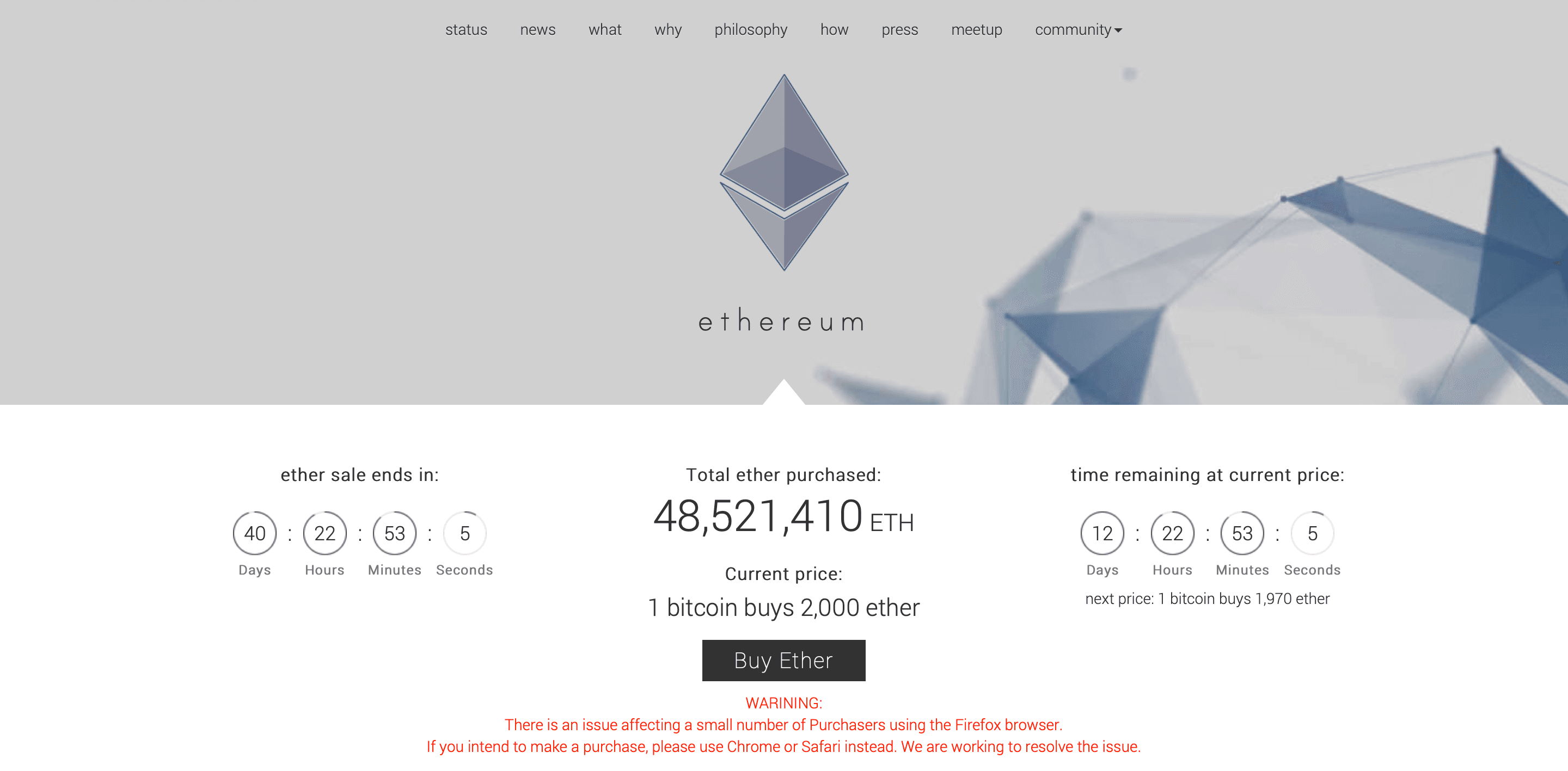
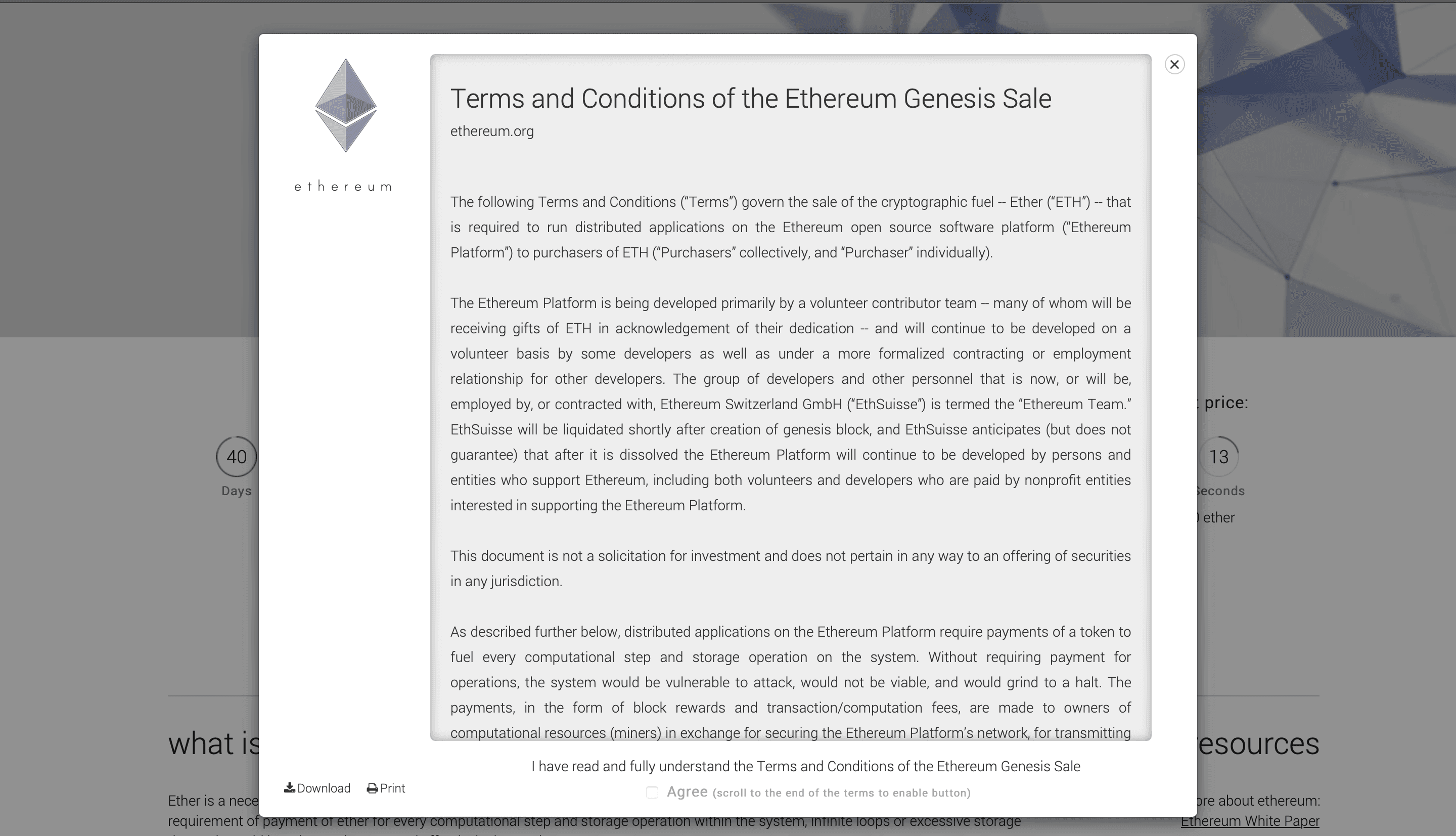
If users clicked the “Buy Ether” button, they had to read and agree to the Terms & Conditions statements.
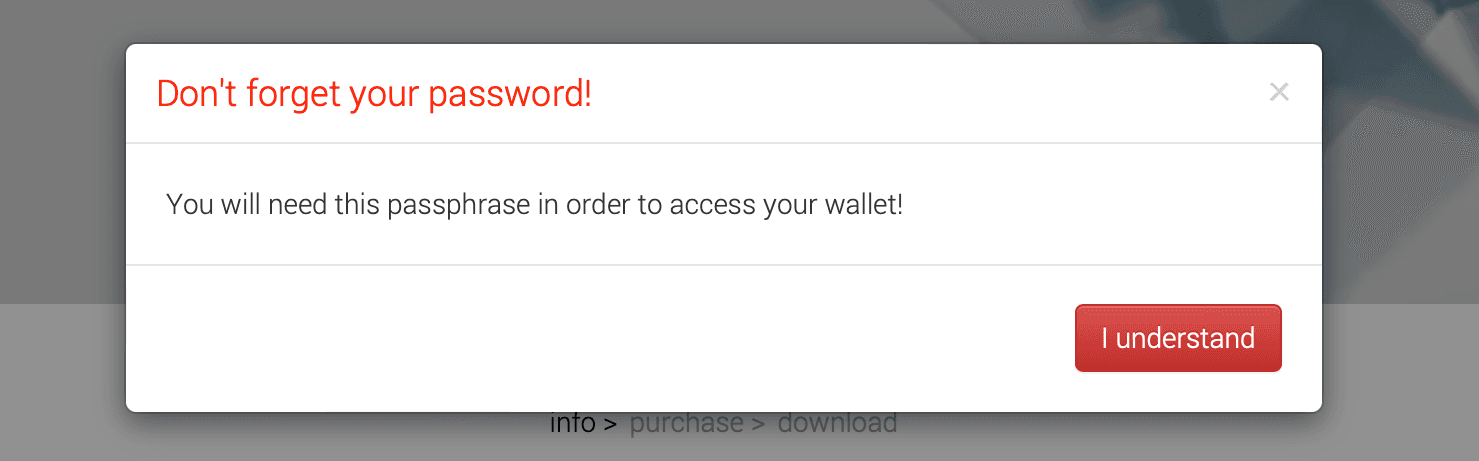
From here, users entered how much BTC they wanted to trade for ETH, with the minimum set at 0.01 BTC and the max at 500,000 BTC. Users then needed to enter an email address and create a password for their account. The Ethereum Foundation warned users they would need their password to recover their presale wallet.
After hitting “Continue,” the next page told users to move their cursor around to generate a random wallet address.

On the second-to-last page, investors had to download their new ETH presale wallet and the associated JSON file before sending their BTC. There was a QR code on this screen with the Ethereum Foundation’s Bitcoin payment address, as well as info on the new Ethereum presale wallet address.
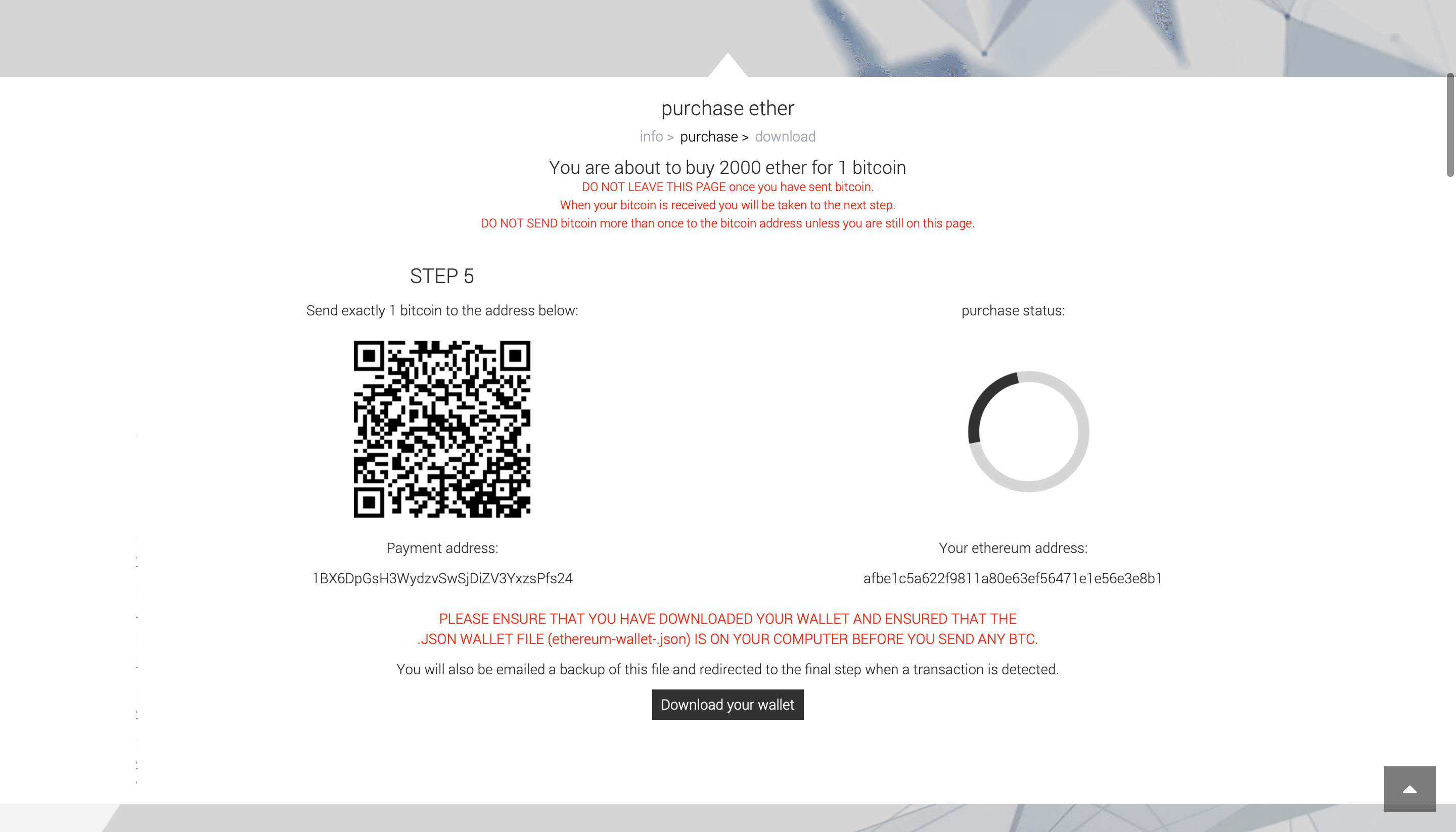
The Ethereum Foundation also sent a backup JSON file to the email address registered at the start of this process. This file is also called Ethereum presale keystore, due to the format of the JSON file.
Explaining the Ethereum presale wallet JSON format
An Ethereum presale wallet file is typically a small JSON document named something like wallet_wallet_backup.json or ethereum-wallet-
{ "encseed": "97...d4", "bkp": "d7...b3", "ethaddr": "df...e7", "btcaddr": "1b...hM", "email": "example@gmail.com" }
What each field of the Presale JSON means
- ethaddr: the Ethereum address holding your presale ETH balance
- encseed: encrypted seed material, this is the core encrypted data that can only be decrypted with your password
- bkp: a backup/check value included in most presale files
- btcaddr: the Bitcoin address used for purchase of ETH during the presale
- email: the email used to set up the Ethereum presale wallet and receive the JSON file
Common Causes of Ethereum Presale Wallet Recovery Issues
As we’ve helped people regain access to their Ethereum presale wallets, we’ve run across a few common issues people have accessing their ETH. While there could be dozens of potential problems with your presale wallet, chances are you’re having trouble with one of the following situations.
Misplaced or Forgotten Ethereum Presale Password
Arguably, the most common reason people can’t get into the Ethereum presale wallet is that they don’t know their password. Whether you forgot where you stored your Ethereum presale wallet’s password, you can’t remember it, or the password you have isn’t correct, you can’t decrypt your wallet’s private key without this crucial info.
Missing Ethereum Presale JSON File
Along with the password, the JSON file associated with an Ethereum presale wallet is essential to claiming your ETH. Remember, each JSON file contains the private key for your wallet, so you need this information to access your ETH on the Ethereum blockchain. Unfortunately, some people deleted this file from their email or lost access to it on the computer they downloaded it on.
Software Bugs Affecting Ethereum Presale Wallet Recovery
Working with various clients, we’ve identified a few bugs, glitches, and other issues with Ethereum’s code which make it impossible for early investors to access their presale wallet. For instance, in one case, an ETH presale wallet owner couldn’t get into their account because of foreign characters they used during setup. Even though this client knew their password, the presence of these foreign characters prevented the decryption process.
Hard Drive Damage or Inaccessible ethereum_backup_wallet.json File
In addition to software issues, a few investors have trouble because there’s a problem with the computer they used to download their ethereum_backup_wallet.json file. If there’s an issue with the computer’s hardware, then there’s a risk you can’t reclaim the crypto you downloaded during the set-up process.
Phishing Scams and Hacks around the Ethereum Presale Wallet
Since the Ethereum presale was a major success, it attracted many scammers into the crypto industry. Indeed, during the presale, the Ethereum developer community pointed out the rise in fraudulent social media profiles and sites claiming to offer premined ETH. Some early investors might have lost their presale Ethereum wallet due to a cyberattack or a scam.
For pro tips on protecting yourself from phishing scams, read ReWallet’s full "Guide to Phishing Attacks".
Recovering Your Ethereum Presale Wallet: Reclaim your ETH Step-by-Step in 2026
Recovering the ETH in your Ethereum presale wallet depends on how much info you have to start with. Ideally, you’ll have both your JSON file and the correct password.
Please be advised that recovering an Ethereum presale wallet using any third-party wallet software always carries inherent risks. Handling wallet files, passwords and private keys can expose your funds to phishing attacks, malware or user error if done incorrectly. Only proceed if you fully understand the process and are confident you are using the official website in a secure environment.
Recovering Ethereum Presale JSON File and Password with MyEtherWallet
With your Ethereum presale JSON file and the correct wallet password, you can recover access to your ETH by following these steps:
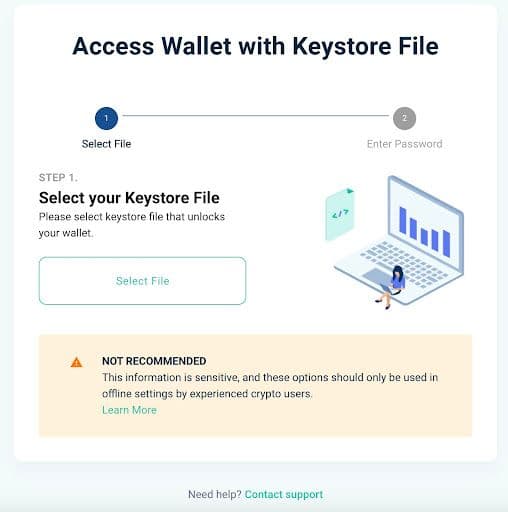
- Go to the official website: https://www.myetherwallet.com
- On the homepage, click “Access My Wallet”.
- Select “Software”, then choose “Keystore File”.
- Upload your Ethereum presale JSON file (via file browser or drag-and-drop).
- Enter your presale password exactly as you originally created it.
- If correct, you will gain access to your ETH.
If nothing happens after entering your presale password, it may indicate that the password is incorrect. MyEtherWallet does not display a clear error message when entering a wrong password for a keystore file.
In this case, do not lose hope. As long as you still have the original presale JSON file, you have the most important piece for wallet recovery. Professional wallet recovery services may be able to assist in recovering your presale password.
Recovering Ethereum Presale JSON File and Password with MyCrypto Wallet
Similar to MyEtherWallet, MyCrypto also allows to import Ethereum keystore files and thus recover your Ethereum presale wallet:
- Go to the official MyCrypto website: https://mycrypto.com
- Download and install the MyCrypto Desktop App (keystore files cannot be imported via the browser interface).
- Open the MyCrypto Desktop App.
- Select “Keystore”.
- Upload your Ethereum presale JSON file.
- Enter your presale password exactly as you originally created it.
- If correct, you will gain access to your ETH.
If the password is incorrect, MyCrypto will display the message: "Please enter a valid password." This indicates that the entered password does not match the keystore file. Even a small typo, incorrect capitalization or missing character will prevent access.
Recovering Ethereum Presale Private Key with pyethtool
One method to recover an Ethereum presale wallet is to decrypt the original presale JSON file with pyethsaletool.py. If you still have your JSON backup and remember the password, the script can decrypt the encrypted seed and reveal the private key that controls your ETH. For safety, always work on a copy of your JSON file and run the script offline on a trusted computer.
Example usage in the terminal:
python pyethsaletool.py getethprivkey -w ethwallet.json
After running this command, you’ll be prompted to enter your presale password. If the password is correct, the script will output your private key. You can then import this private key into another Ethereum wallet solution such as MetaMask (for example, via “Import account” → “Private key”) to access and move your presale ETH.

Struggling to access your Ethereum Presale wallet?
ReWallet’s specialized Ethereum presale wallet recovery services can help you regain access to your Presale wallet!
Recover your Ethereum Presale walletLost Ethereum Presale Wallet Password Recovery
If you have lost your Ethereum presale wallet password but still possess the original JSON file, recovery may still be possible.
Important Note: Attempting to recover an Ethereum presale wallet password on your own can carry significant risks. Using recovery tools incorrectly, downloading compromised software or exposing your wallet file in an unsafe environment can result in permanent loss of your ETH.
Try Guessing Your ETH Presale Wallet’s Password
If you’re missing the password for your Ethereum presale wallet, consider manually trying a few of your most common passwords and writing down each failed attempt. Although many users remain confused about the exact Ethereum Presale Wallet password requirements - as witnessed in discussions like this Reddit thread - ethereum.org did enforce specific rules. Understanding these requirements can help you make more informed and qualified password guesses for your Ethereum Presale Wallet: :
- 10+ characters
- Include at least one number
- Include at least one uppercase and lowercase letter each
- Include at least one symbol
- Screened against frequently used and insecure passwords such as “Password1!”
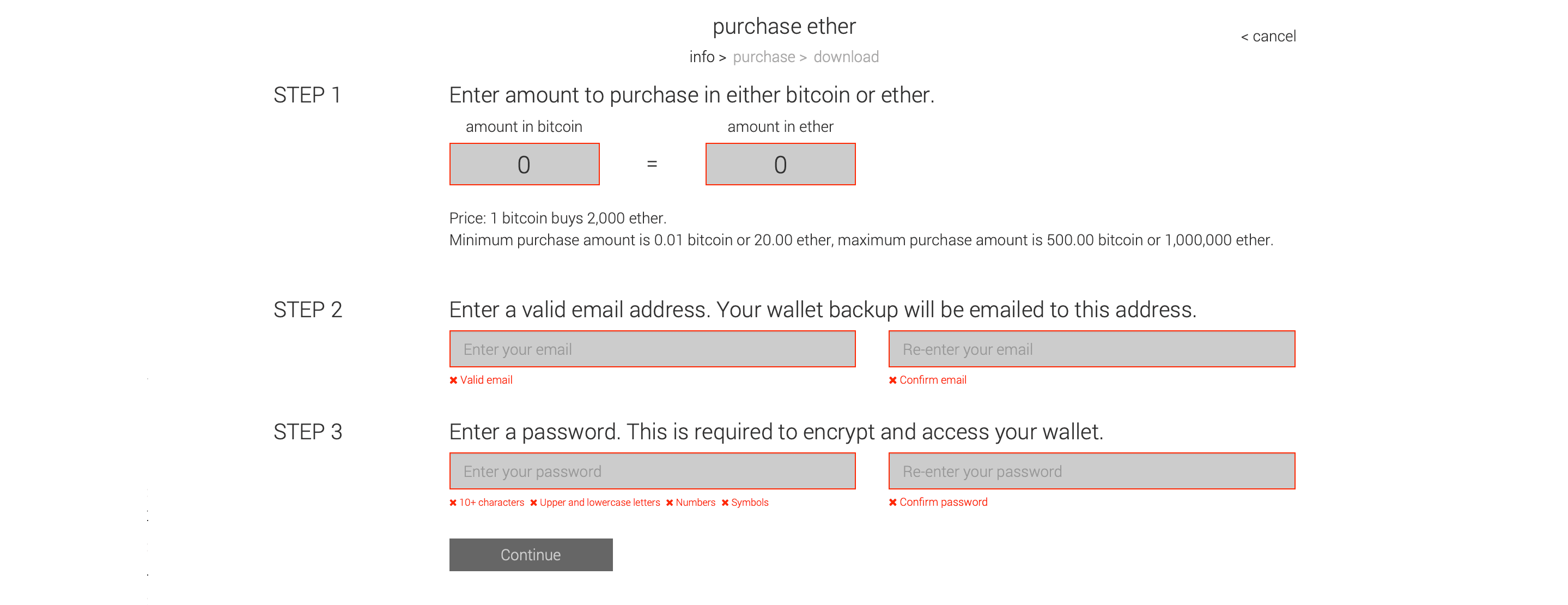
If you’re not having luck manually trying passwords, you could consider brute forcing it. Just be sure to include the above restrictions to ensure every attempt meets the guidelines for the Ethereum presale wallet passwords. If your password is missing or not working, first check simple causes:
- Wrong keyboard layout
- Caps lock
- Trailing spaces
- Old password manager entries
- Similar-looking characters
Older Ethereum tools also handled passwords differently, so trying more than one recovery tool can help confirm whether the password is truly incorrect.
Ethereum Presale Wallet Password Recovery Tools (DIY Methods)
If you no longer remember your Ethereum presale wallet password, there are a few technical recovery tools that allow you to test password candidates directly against your presale JSON file. These methods are mainly used by advanced users who want to attempt recovery on their own before seeking professional help. As with any Ethereum presale wallet recovery attempt, always work on a copied wallet file and run everything offline on a secure computer.
Recovering an Ethereum Presale Wallet Password with pyethrecover
pyethrecover is a lightweight community tool built specifically to test password candidates against Ethereum presale wallet files. This approach works best if you partially remember your password or want to automate trying many likely variations instead of testing manually.
You typically provide the wallet file and a list of possible passwords, and the tool checks each candidate until a match is found.
Example usage (terminal command): python pyethrecover.py --wallet ethwallet.json --passwordlist passwords.txt
Because this tool directly tests passwords against the original presale format, it’s often a practical first step for users who still have reasonable guesses about their password structure.
Using Hashcat to Recover an Ethereum Presale Wallet Password
For more advanced recovery attempts, many users turn to Hashcat, a GPU-based password recovery tool. Before Hashcat can be used, you must convert your Ethereum presale wallet file into a crackable hash format. This conversion step is done with the script ethereum2john.py.
The script extracts the encrypted data from your JSON file and produces a hash string that recovery tools can process.
Example extraction step: python ethereum2john.py ethwallet.json > hash.txt
After the hash has been generated, Hashcat can attempt password recovery using: Mode 16300: Ethereum Pre-Sale Wallet (PBKDF2-HMAC-SHA256)
Example Hashcat usage (wordlist attack): hashcat -m 16300 hash.txt -a 0 wordlist.txt
Since the extracted hash contains everything needed to attempt password recovery, treat it as sensitive data and never upload it to online services.
Ethereum Presale Wallet Password Recovery with John the Ripper (JtR)
John the Ripper is another popular password recovery tool that can be used for Ethereum presale wallets. The workflow starts exactly like the Hashcat method above: first run ethereum2john.py to extract the hash from your presale JSON file.
Example extraction step (same as Hashcat): python ethereum2john.py ethwallet.json > hash.txt
After that, John can test password candidates using wordlists or rule-based attacks.
Example John usage: john.exe --wordlist=passwords.txt hash.txt
Security Best Practices When Using DIY Recovery Tools
Before running any Ethereum presale recovery software, take time to review the source code and verify that you are downloading the tools from their official repositories. Community recovery tools should always be executed in a fully offline environment to reduce risk. Wallet data, extracted hashes, and private keys should never be exposed on an internet-connected device.
Seek Professional Help From Crypto Wallet Recovery Experts
For those still struggling with Ethereum presale wallet recovery, consider contacting a professional crypto recovery service experienced with this particular issue. Even if you don’t have all the information on your password or JSON file, there’s a chance an expert wallet recovery service can figure out the issue and regain access to your account. Before you rule out getting back into your Ethereum presale wallet, send an email to ReWallet’s team for a professional assessment.
Outdated Ethereum Presale Wallet Recovery Methods
Recovering Your Presale Wallet with GETH
In earlier years, Ethereum presale wallets were commonly restored using geth (Go Ethereum). The presale JSON file could be imported into the keystore directory and unlocked directly through geth.
However, this approach is now largely outdated and no longer practical for most users. Recent versions of geth no longer support running a light node in the same way older versions did. Additionally, newer key management tools such as Clef and Web3Signer are not compatible with Ethereum presale wallet files.
While it is technically possible to attempt recovery using older geth versions, this requires advanced knowledge of command-line tools, node synchronization, and secure key handling. For most users, modern wallet interfaces are significantly safer and more practical.
Safety Strategies to Protect Your Ethereum Presale Wallet
As you try to recover the ETH stuck in your presale Ethereum wallet, it’s essential to put as many safety measures in place to prevent critical pieces of data from slipping out of your hands. Even if you only have partial info on your JSON file or password, please take proactive steps to safeguard this data and increase the odds of a successful recovery.
- Create multiple backups for passwords and store them in separate, secret, and secure areas. For more info on the best practices for backing up your passwords, check out ReWallet’s previous guide on “Secure Passwords and Backups”.
- Be sure to only keep your JSON file on a computer you’re sure isn’t compromised with viruses, malware, or other issues. Also, it’s best to create a local offline copy of the JSON backup or put it in an encrypted flash drive before deleting the email with this information. Keeping this sensitive file in your mailbox puts you at a greater risk of a hack.
- Be extra cautious when researching solutions for Ethereum presale wallets. Unfortunately, there are a lot of scams in the crypto space, especially surrounding valuable Ethereum presale wallets. Only work with professional crypto recovery services with a transparent and proven track record for helping clients struggling with wallet recovery.
Ethereum Presale Wallet FAQs
The safer option is to consult with a professional wallet recovery service such as ReWallet who have developed dedicated tools for Ethereum presale password recovery.
There were also historical discussions around potential legacy wallet bugs in early versions of Mist and geth. Some users reported that certain special characters (such as @, ß, or dots) may have been handled incorrectly due to encoding issues, potentially altering how the password was interpreted during encryption. However, many of these cases ultimately turned out to be typographical errors rather than confirmed encryption flaws.
In case you lost access to the email account contact your email provider directly. Depending on their policies, account access may be restored and deleted emails can sometimes be recovered.
Next, thoroughly search all local storage locations where the file may have been saved, including hard drives and previous computers. If the JSON file was accidentally deleted, professional wallet recovery services may be able to recover it if the data has not been heavily overwritten.
Importantly, you do not need the password or decrypt the file to see the address. Once you have the address, simply look it up on any Ethereum blockchain explorer to check for your presale (genesis) ETH balance.
If you have your backup JSON file on an email address, consider putting it on an encrypted flash drive or in some form of offline storage before deleting this message. To avoid becoming a victim, you should also pay attention to news of the latest hacks or phishing scams from credible sources like the Ethereum Foundation.